Best reel maker app in 2026: 5 options compared
In short
The best reel maker app depends on what you start with. If you have footage to cut, a free editor such as Instagram's Edits, CapCut or InShot fits; if you design in Canva, its Magic Video turns clips and photos into a vertical video.
If you sell products and have only a photo, SuperReels is the best choice: pick a tested template, upload the photo and get a finished vertical reel in a few minutes, first one free.

There is no single best reel maker app, because people mean two different things by it. Most apps on this list are editors: you bring footage and they help you cut it. One makes the footage for you from a photo. Pick by what you have on your phone right now.
How we compared each reel maker app
We looked at what each app is for, whether there is a free way to use it and whether a price is published, all checked on each company's own site as of October 2026. Where a site did not say something, we left it out.
| App | What it is | Free option | Published price | Best for |
|---|---|---|---|---|
| SuperReels | AI mockup video generator from a product photo | First video free, no card | From $10/mo | Product reels without filming |
| CapCut | Photo and video editor on desktop, web and mobile | Free online tools, no card | Not published on its homepage | Editing footage you filmed |
| Canva | Design suite with Magic Video | Free plan | Pro US$18/mo | Teams already designing in Canva |
| Edits | Instagram's video creation app | Free to download | None needed | Creators posting to Instagram |
| InShot | Mobile video editor and maker | Subscription removes logo and ads | Not published on its site | Quick phone edits |
1. SuperReels: our pick for product reels
SuperReels is the best choice for sellers who want a product reel and have no footage. You upload a photo of your product, choose a template from the mockup library, fill in a few details in plain words, and a finished vertical 9:16 video of 10 or 15 seconds arrives in a few minutes.
- Tested templates instead of prompt writing; the prompt is never shown.
- Your product stays close to your photo.
- No watermark, commercial use allowed, 720p on every plan and up to 4K on Pro.
- First video free with no card, plans from $10 a month, the cost shown before you generate and a refund if a video fails.
- Image templates and AI product photos too.
Best for: product sellers who need reels for Instagram, TikTok or Shorts without a shoot.
2. CapCut
CapCut calls itself an "AI-Powered Photo & Video Editor for Everyone", with desktop, online, mobile and tablet versions. Its site offers free online tools with no credit card required (CapCut, as of October 2026).
Consider CapCut if you already have clips and want a full editor with templates to cut them.
Best for: editing your own footage.
3. Canva
Canva's Magic Video turns 1 to 10 of your own clips or photos into a vertical video of up to 60 seconds, on all plans. When we checked in October 2026, Canva Free was $0 and Pro was US$18 a month or US$144 a year, before tax and varying by region (Canva pricing). See our SuperReels vs Canva comparison.
Consider Canva if your brand kit, posts and reels already live there.
Best for: small teams that design everything in one place.
4. Edits by Instagram
Edits is "the new video creation app by Instagram that helps creators make great videos on their phones", on iOS and Android, with exports that have no watermark (Instagram Creators, as of October 2026). Instagram says it is "available globally and free for download" (Introducing Edits, as of October 2026).
Consider Edits if you film yourself and post mainly as a reel maker for Instagram.
Best for: creators who shoot on their phone.
5. InShot
InShot describes itself as an "all-in-one Video Editor and Video Maker", for iOS, Android and Huawei (InShot, as of October 2026). Its terms say a paid subscription unlocks paid materials and removes the InShot logo and ads, billed monthly or annually; prices are not listed on the site (InShot terms, as of October 2026).
Consider InShot if you want a simple phone editor for quick trims, music and captions.
Best for: fast edits on a phone.
What the finished video looks like
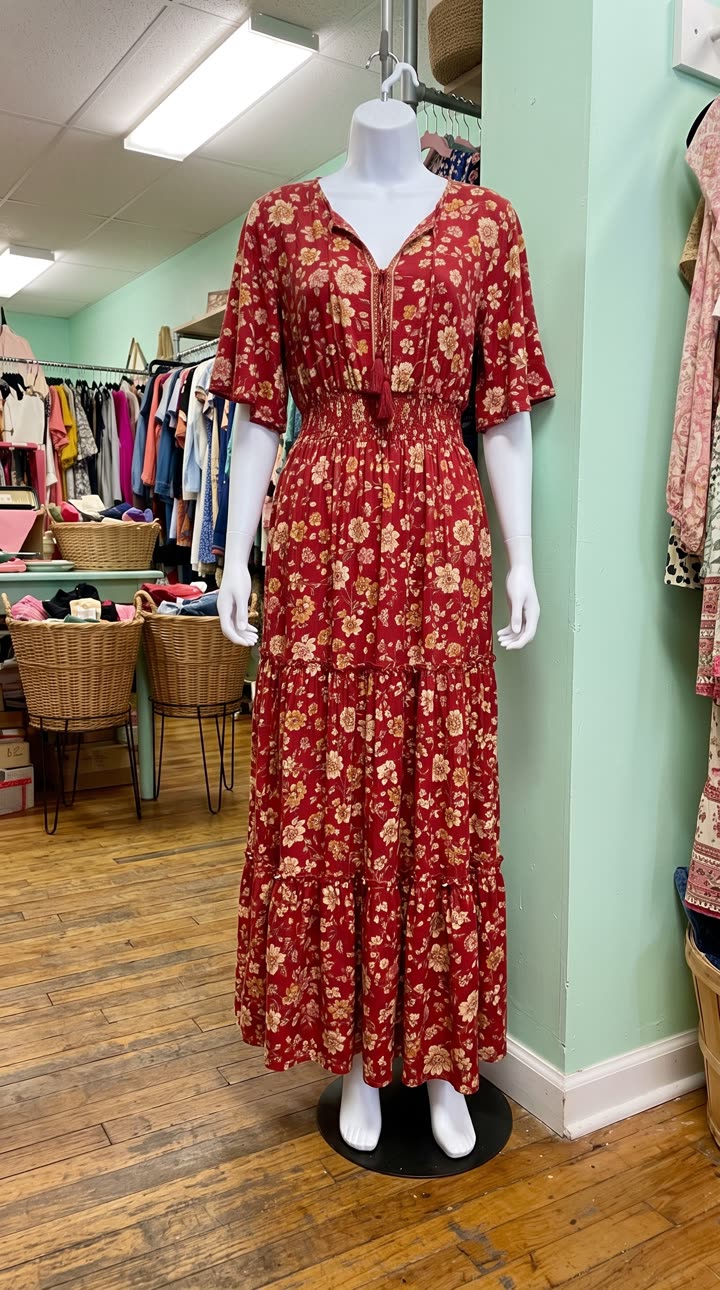
Made with the Outfits of the week template from five mannequin photos like the one on the left, in a few minutes, with no filming or editing. See the exact steps and details we used.
Verdict: the best reel maker app for your job
Whichever reels maker app you choose, start from what you already have. If you have footage, the best free reel maker app is an editor: Edits for Instagram-first creators, CapCut for a fuller toolkit, InShot for quick trims. If you have only a product photo, use SuperReels.
- Open the AI reel maker.
- Upload a clear photo of your product.
- Pick a template, such as the product ad, and fill in a few details.
- Download your finished reel a few minutes later and post it.
Questions
Which reel maker app is free?
Edits is free to download, CapCut offers free online tools with no card, and Canva has a free plan. SuperReels gives your first video free with no card.
Do I need footage to make a reel?
With an editor, yes: you cut clips you have filmed. With SuperReels, a single product photo is enough, because the scene is generated from it.
Will my reel have a watermark?
SuperReels videos have no watermark. Edits says its exports have no watermark. InShot's terms say a subscription removes the InShot logo.
Can I use more than one app?
Yes. Many sellers make the product video in SuperReels and add captions or music in an editor afterwards.